First look: Windows 11 is replacing Windows 95-era Properties dialog, now with dark mode and WinUI
Microsoft has finally begun replacing the decades-old File Explorer Properties dialog with a modern version as part of the company’s efforts to modernize Windows 11. Thankfully, the new Properties dialog is built using the native WinUI framework, and we’re not seeing any traces of a WebView2-based shell. Right now, the Properties dialog is native to […] The post First look: Windows 11 is replacing Windows 95-era Properties dialog, now with dark mode and WinUI appeared first on Windows Latest
 admin
admin
Microsoft has finally begun replacing the decades-old File Explorer Properties dialog with a modern version as part of the company’s efforts to modernize Windows 11. Thankfully, the new Properties dialog is built using the native WinUI framework, and we’re not seeing any traces of a WebView2-based shell.
Right now, the Properties dialog is native to the Win32 comctl32.dll (Common Controls library), which first shipped with Windows 95. Of course, it has improved visually over the past several years, but the underlying code hasn’t drastically changed.
Microsoft previously confirmed it’ll replace all legacy dialogs with modern versions, including those from Windows 8 and even the Windows 95 era. It’s been unclear when a major Windows design update would begin rolling out, but we’re now seeing early signs in preview builds.
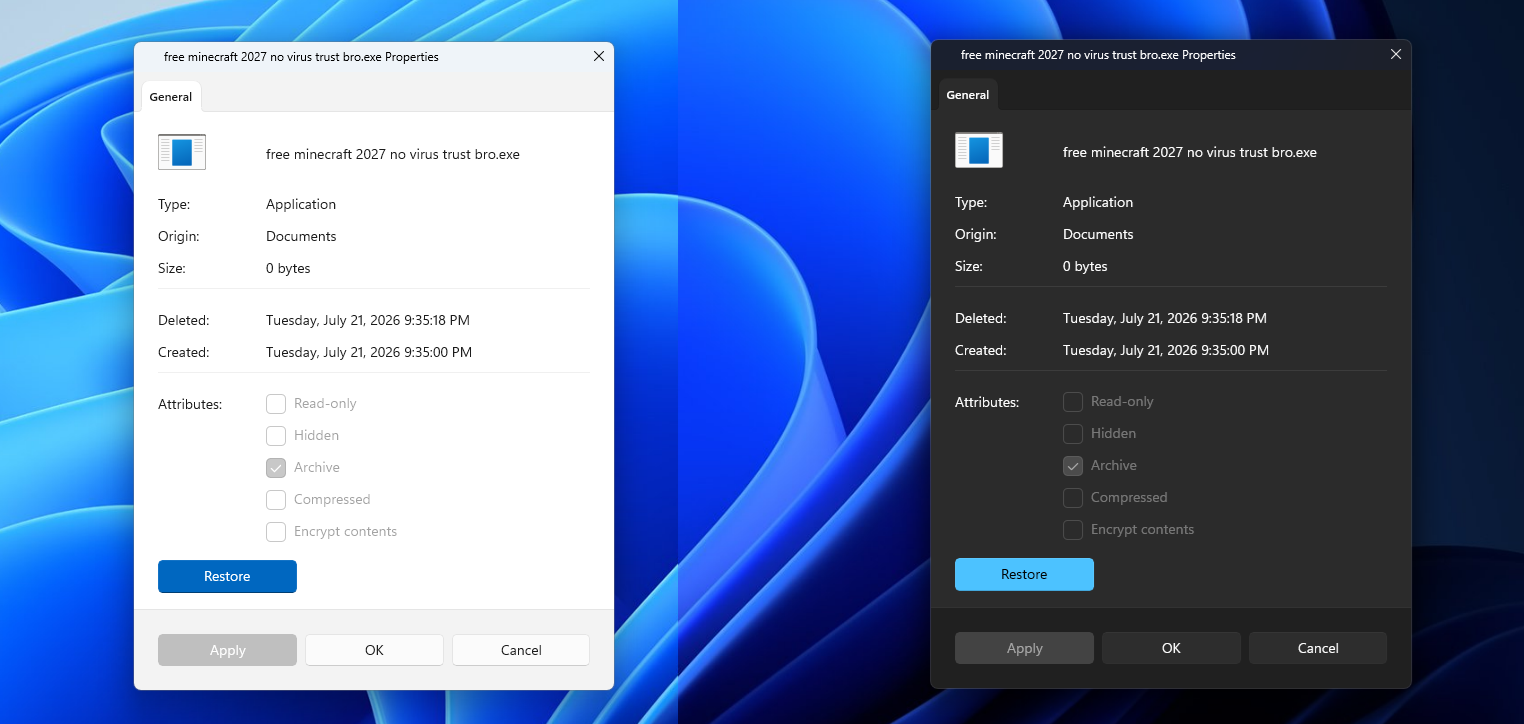
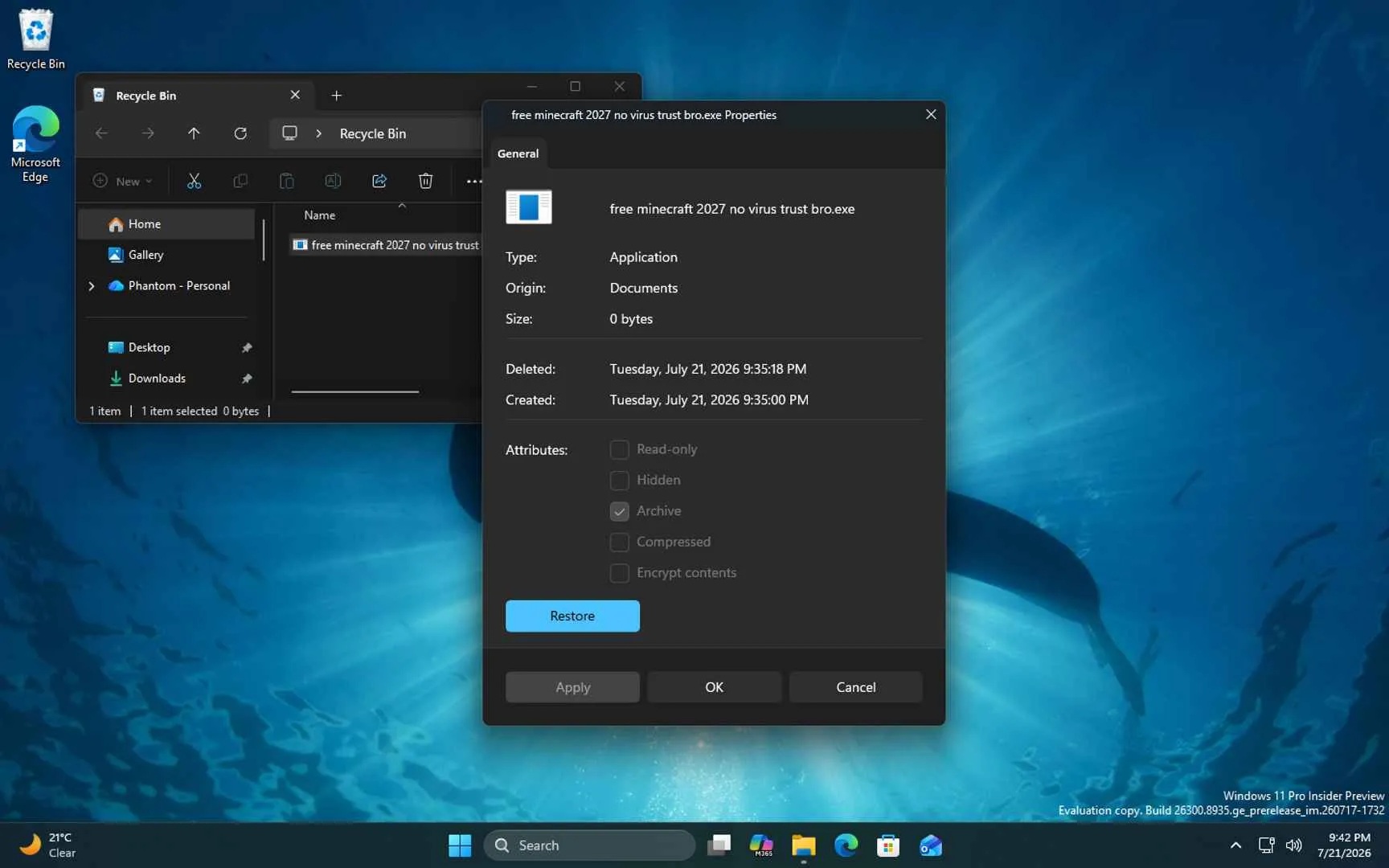
Microsoft watcher PhantomOfEarth found a new Properties dialog in preview builds, and unlike the existing implementation, the new version supports dark mode.
Moreover, it’s clearly built using WinUI 3 rather than a Win32 property sheet. Microsoft is not mixing the two frameworks, as I can confirm it’s entirely WinUI 3.
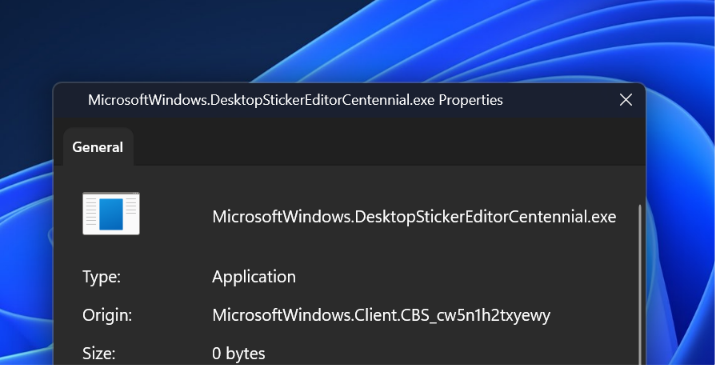
For example, if you look closely, the “General” tab uses a Pivot-style header and supports an accent indicator, which is only found in the WinUI 3 framework. You don’t have that in Win32, where the Properties dialog uses SysTabControl32, which is part of comctl32. Likewise, the Restore button uses AccentButtonStyle.
Finally, you have new checkboxes that follow WinUI 3 guidelines with rounded corners. It’s subtle, but it’s necessary for design consistency.
Microsoft is planning to drop the classic Properties dialog entirely, which is quite interesting because the dialog has been part of Windows for almost three decades. The existing Properties dialog was built on the Windows 95-era property sheet API (PROPSHEETPAGE, SHOpenPropSheet out of shell32) and lacked dark mode and modern accessibility features.
Why Microsoft can’t just randomly modernize Windows 11 components and call it a day
Windows is a legacy operating system, and that’s also part of the reason why the company tried building editions like Windows 10X in the past. Windows is difficult to modernize without breaking backward compatibility.
That also means Microsoft can’t just slap a modern design on the Win32-based Properties dialog and not expect third-party apps to break.
Microsoft has a responsibility to support decades-old software, which is why you can download an app or game made for Windows 95 and still run it on Windows 11. That backward compatibility approach also applies to Properties and other legacy dialogs and property sheets, where any change could break existing integrations.
Right now, third-party apps often inject tabs into the Properties dialog using IShellPropSheetExt.
Microsoft’s documentation describes IShellPropSheetExt as an interface that “allows a property sheet handler to add or replace pages in the property sheet displayed for a file object.”
When apps use the extension to add a tab to the Win32 property-sheet system, each page is created as a traditional dialog and handed back to the Windows Shell.
This includes third-party antivirus software, 7-Zip, Dropbox, codec packs, and so on, all of which hand back an HWND-based page.
Microsoft is replacing the Win32 Properties host with WinUI, and it needs a reverse-islanding path to embed those legacy HWNDs inside the new tab strip, or those extensions will break. The above screenshot shows a Recycle Bin item, which only has a General tab, but that’s not the case for other programs.
For example, if you right-click certain apps and go to their Properties, you’ll see Security, Details, Previous Versions, and even third-party tabs coexisting. It’s unclear how Microsoft is integrating those legacy third-party tabs, but I assume it has figured out how to reverse-island the path.
My other concern is that WinUI surfaces have historically paid a cold-start cost when loading the runtime. Even today, File Explorer’s WinUI context menu gets criticized for exactly that. The WinUI-based Home tab in File Explorer is slower than “This PC,” which does not use WinUI.
All of that should improve soon, as Microsoft has plans to optimize WinUI 3, and that could explain why the revamp is taking longer than usual.
The post First look: Windows 11 is replacing Windows 95-era Properties dialog, now with dark mode and WinUI appeared first on Windows Latest